AccuBattery: How to Check the Real Health of Your Smartphone Battery Before Replacing It

Battery degradation is one of the most common reasons why smartphones begin to feel slower, less reliable and harder to use throughout the day. Many users decide to replace a battery after noticing rapid discharge, overheating or unexpected shutdowns, yet in many cases the actual battery condition is still acceptable. AccuBattery has become one of the most widely used Android applications for measuring battery wear, charging behaviour and real capacity. In 2026, the app continues to provide detailed statistics that help users understand whether a battery replacement is truly necessary or whether the issue is caused by background applications, charging habits or system settings instead.
How AccuBattery Measures Battery Health on Android Smartphones
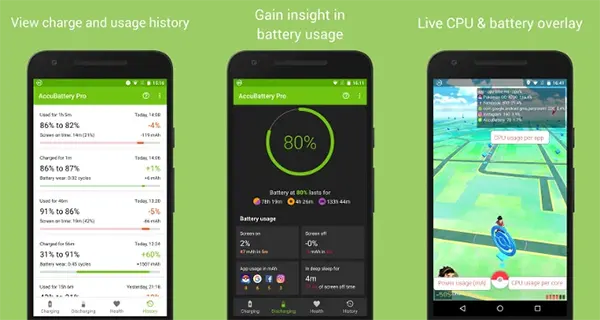
Unlike basic battery indicators built into Android, AccuBattery analyses charging and discharging cycles over time. The application compares the estimated current battery capacity with the original factory capacity declared by the manufacturer. This allows users to see how much energy the battery can actually store after months or years of use.
The application calculates battery wear by tracking how many milliampere-hours are added during charging sessions. Instead of relying on a single reading, it gathers data across multiple cycles to improve accuracy. For most smartphones, the first reliable battery health estimate appears after several complete charging sessions. The longer the application is used, the more precise the statistics become.
In 2026, AccuBattery supports most Android devices running modern Android versions, including Samsung Galaxy, Google Pixel, Xiaomi, OnePlus and Motorola smartphones. Some manufacturers still limit access to certain battery telemetry data, but the app remains one of the most practical tools available for estimating real battery condition without specialised hardware.
What Battery Health Percentage Actually Means
Battery health represents the remaining usable capacity compared with the original factory specification. For example, if a smartphone originally included a 5000 mAh battery and AccuBattery reports 4000 mAh, the estimated battery health would be around 80%. This means the battery can store less energy than when the phone was new.
Most lithium-ion smartphone batteries begin showing noticeable wear after roughly 500 charging cycles. Heavy gaming, fast charging, overheating and constant full-charge storage can accelerate chemical ageing. By 2026, many smartphone manufacturers optimise charging behaviour through adaptive charging systems, but long-term degradation still remains unavoidable.
As a general guideline, battery replacement becomes worth considering when battery health drops below 75-80%, especially if the device shuts down unexpectedly or struggles to maintain stable performance under load. However, battery percentage alone should not be treated as the only factor. Charging speed, temperature stability and real daily usage matter as well.
How to Use AccuBattery Correctly for Accurate Results
After installing the application from Google Play, users should grant battery monitoring permissions and allow the app to collect statistics in the background. Immediate readings are usually inaccurate because the system requires several charging sessions to establish a realistic baseline.
For the best results, it is recommended to charge the smartphone normally for at least five to seven days. Partial charging sessions are acceptable because AccuBattery combines data from multiple charge intervals. The application also tracks charging speed, battery temperature and estimated wear caused by different charging methods.
One of the most useful features remains charging alarms. AccuBattery can notify users when the battery reaches a selected charge level, such as 80%. This helps reduce unnecessary stress caused by keeping lithium-ion batteries at 100% charge for extended periods. While modern smartphones include battery protection systems, limiting full charges can still slow long-term degradation.
Common Mistakes When Checking Smartphone Battery Condition
Many users expect instant accuracy after installing the app, but battery diagnostics require time and repeated measurements. Checking battery health after only one charging session often produces unreliable results. The app needs consistent data to estimate true capacity correctly.
Another common mistake involves using unofficial or damaged charging accessories. Low-quality chargers and cables may deliver unstable voltage, causing incorrect readings or excessive heat generation. In some cases, charging issues blamed on battery wear are actually caused by faulty charging equipment.
Users should also avoid interpreting every battery drain issue as battery failure. Background applications, poor mobile signal, high display brightness and outdated software can significantly reduce battery life even when battery health remains above 85%. AccuBattery helps separate actual battery degradation from software-related power consumption problems.
When a Smartphone Battery Should Actually Be Replaced
Battery replacement becomes more reasonable when several symptoms appear together. Rapid discharge, overheating during ordinary use, unstable percentage readings and sudden shutdowns under moderate load often indicate advanced battery wear. In such situations, AccuBattery statistics can help confirm whether the battery has significantly degraded.
In 2026, many Android smartphones still use lithium-ion or lithium-polymer batteries with limited long-term lifespan. Although modern chipsets are more power efficient, increased screen refresh rates, AI processing and fast charging systems continue placing heavy demands on batteries. Devices used intensively for gaming, navigation or video recording tend to experience faster capacity loss.
Before replacing a battery, users should also evaluate repair costs and overall device condition. Replacing a battery in a recent flagship model is often worthwhile because it restores usability for another two or three years. For older entry-level devices with outdated processors or limited software support, replacing the entire phone may be the more practical option.
How Battery Temperature Affects Long-Term Smartphone Performance
Heat remains one of the biggest threats to lithium-ion battery lifespan. Repeated exposure to high temperatures accelerates chemical degradation inside battery cells, permanently reducing capacity over time. Fast charging while gaming or using navigation apps can generate excessive heat that gradually damages the battery.
AccuBattery includes temperature monitoring features that allow users to observe charging temperatures in real time. Ideally, smartphone battery temperatures should remain moderate during charging sessions. Frequent temperatures above 40°C may indicate aggressive charging behaviour, poor ventilation or environmental heat exposure.
Reducing heat exposure can noticeably extend battery lifespan. Removing thick protective cases during fast charging, avoiding direct sunlight and using certified charging accessories all help maintain healthier battery conditions. These small habits often delay the need for battery replacement and improve long-term device stability.